
It’s Like Building a Playlist
Remember when playing music on your computer or portable device meant ripping your CDs and carefully managing all the songs you wanted? Now, they are just available. You build a playlist without having to manage anything. That’s what RefRunner does for your references.
Just drag your paper onto your browser. RefRunner will show you which citations have matching references. It will help you search for the missing references, formatting them perfectly. For references you provide, it’ll verify that they are correct, or fix them when they are imperfect–fixing formatting, capitalization, and adding missing DOIs. You can then copy/paste into your document, or download an updated version with the references replaced.
RefRunner in Action
The image below shows that “Baytiyeh & Pfaffman (2010)” is missing. Clicking it searches for the author-year and finds it! If it’s not there, type a few words–it searches as you type. Click to add it to your list.

Did your co-author (or Google Scholar, or worse, an LLM) produce a half-right reference? RefRunner fixes it:

RefRunner adds the DOI, the correct volume and number, and the page numbers. It fixes the capitalization to match APA guidelines.
Now you’re done. You added the missing reference, fixed the incorrect one, and verified the other. It’s time to update your document.
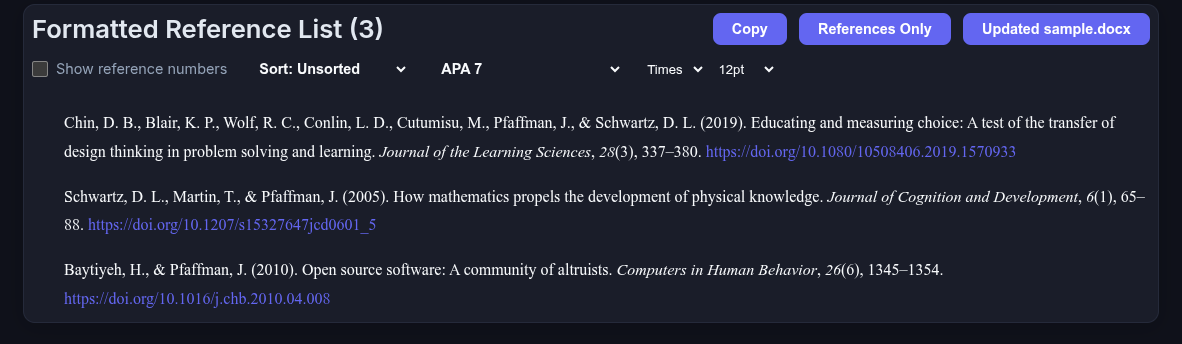
There they are! Now you can copy and paste them into your document, or click the “updated sample.docx” button to get an updated version of your document with the old references replaced with the corrected ones.
Give it a spin at RefRunner!